
I’m testing the new Guardrails feature in n8n for a while now.
During testing I've stumbled upon an issue that I think is worth sharing.
The issue - passing an object to Guardrails
When you pass an object to Guardrails node, it doesn't work as expected. First of all Guardrails node doesn't support objects. It supports only strings. But you can pass a full object to Guardrails node stringify it using JSON.stringify() and it will process it as a string.
Lets prepare the initial workflow
Let's start with initial workflow:
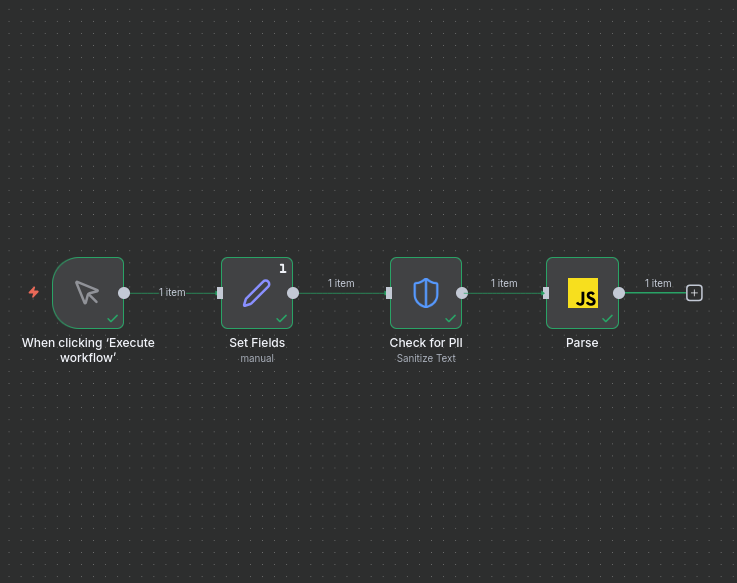
As you can see, we have a simple workflow with Manual Trigger, Set fields and Guardrails node. The Guardrails node is configured to sanitize the input text.
Set fields node is configured to set the input object.
Set fields node returns JSON like below:
[
{
"content": "Content with emails adam@adam.com and my friends email kate@kate.com ",
"receiverEmail": "agnes@agnes.com ",
"senderEmail": "pete@pete.com"
}
]
We want to be sure that each email from the list is anonymized. So adam@adam.com,kate@kate.com, agnes@agnes.com, pete@pete.com should be anonymized and changed to <EMAIL_ADDRESS>.
Solution
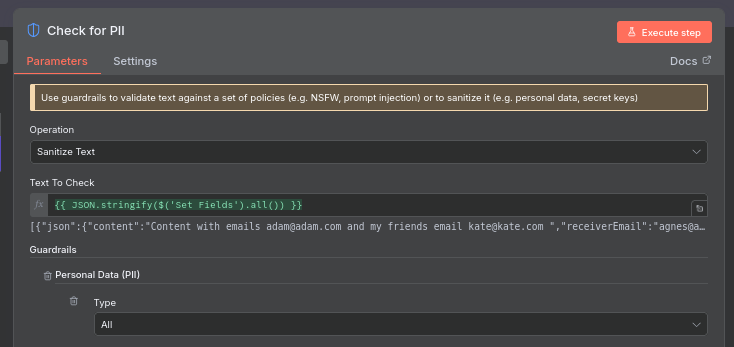
To do it you will need to configure Guardrails node to sanitize the stringified object. Configuration is shown below:
Stringify the object
We need to pass the stringified object to Guardrails node. We can do it using Set fields node and JSON.stringify() function.
{{ JSON.stringify($('Set Fields').all()) }}
Above expression will return stringified object from Set fields node.
Now lets focus on Guardrails node. After passing the stringified object to Guardrails node, it will process it as a string and return the sanitized string like below:
[
  {
    "guardrailsInput": "[{\"json\":{\"content\":\"Content with emails <EMAIL_ADDRESS> and my friends email <EMAIL_ADDRESS> \",\"receiverEmail\":\"<EMAIL_ADDRESS> \",\"senderEmail\":\"<EMAIL_ADDRESS>\"},\"pairedItem\":{\"item\":0}}]",
    "checks": [
      {
        "name": "personalData",
        "triggered": true,
        "info": {
          "analyzerResults": [
            {
              "entityType": "EMAIL_ADDRESS",
              "text": "adam@adam.com"
            },
            {
              "entityType": "EMAIL_ADDRESS",
              "text": "kate@kate.com"
            },
            {
              "entityType": "EMAIL_ADDRESS",
              "text": "agnes@agnes.com"
            },
            {
              "entityType": "EMAIL_ADDRESS",
              "text": "pete@pete.com"
            }
          ]
        }
      }
    ]
  }
]
What we need to focus on is the guardrailsInput field. It contains the sanitized string. We can use it to restore the original object. That's why we need to parse it using JSON.parse() function using Code node.
Parse the stringified object
The Code node is configured to parse the stringified object using JSON.parse() function like visible on below image:
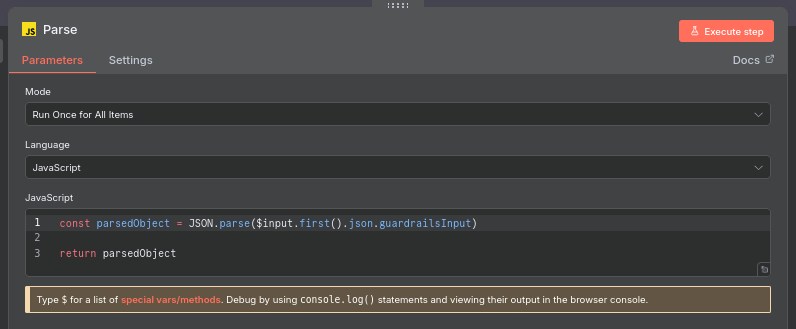
Code node expression:
const parsedObject = JSON.parse($input.first().json.guardrailsInput)

return parsedObject
After parsing the object, we can use it to restore the original object like below:
[
{
"content": "Content with emails <EMAIL_ADDRESS> and my friends email <EMAIL_ADDRESS> ",
"receiverEmail": "<EMAIL_ADDRESS> ",
"senderEmail": "<EMAIL_ADDRESS>"
}
]
Final N8N workflow
To check the final workflow, you can copy below JSON (or copy it from repository file: https://github.com/pjsikora/n8n-workflows/blob/main/guardrails-pass-an-object.json) and import it into your n8n instance (You don't have to save it to the file and import - just copy and paste it into n8n editor).
Please catch me on LinkedIn or X if you have any questions or suggestions:
{
  "nodes": [
    {
      "parameters": {
        "assignments": {
          "assignments": [
            {
              "id": "0b205824-ec65-4728-a035-ad465f5d7821",
              "name": "content",
              "value": "=Content with emails adam@adam.com and my friends email kate@kate.com ",
              "type": "string"
            },
            {
              "id": "692047aa-abed-454b-95d0-d11ef4bfdeae",
              "name": "receiverEmail",
              "value": "=agnes@agnes.com ",
              "type": "string"
            },
            {
              "id": "d89760e3-9326-4714-a05a-8e97677aac2e",
              "name": "senderEmail",
              "value": "pete@pete.com",
              "type": "string"
            }
          ]
        },
        "options": {}
      },
      "type": "n8n-nodes-base.set",
      "typeVersion": 3.4,
      "position": [
        -32,
        48
      ],
      "id": "64c28287-4ba4-4e57-90d0-62d180bd91a1",
      "name": "Set Fields",
      "executeOnce": true
    },
    {
      "parameters": {
        "operation": "sanitize",
        "text": "={{ JSON.stringify($('Set Fields').all()) }}",
        "guardrails": {
          "pii": {
            "value": {
              "type": "all"
            }
          }
        }
      },
      "type": "@n8n/n8n-nodes-langchain.guardrails",
      "typeVersion": 1,
      "position": [
        192,
        48
      ],
      "id": "619d36b1-3b34-4760-831b-d6b4bb06bc18",
      "name": "Check for PII"
    },
    {
      "parameters": {
        "jsCode": "const parsedObject = JSON.parse($input.first().json.guardrailsInput)\n\nreturn parsedObject"
      },
      "type": "n8n-nodes-base.code",
      "typeVersion": 2,
      "position": [
        400,
        48
      ],
      "id": "23ec4b56-7b77-426e-b77a-b1206d0fb5fb",
      "name": "Parse"
    },
    {
      "parameters": {},
      "type": "n8n-nodes-base.manualTrigger",
      "typeVersion": 1,
      "position": [
        -256,
        48
      ],
      "id": "d04278fc-cb75-4c26-a3bf-5aba3bc16828",
      "name": "When clicking ‘Execute workflow’"
    }
  ],
  "connections": {
    "Set Fields": {
      "main": [
        [
          {
            "node": "Check for PII",
            "type": "main",
            "index": 0
          }
        ]
      ]
    },
    "Check for PII": {
      "main": [
        [
          {
            "node": "Parse",
            "type": "main",
            "index": 0
          }
        ]
      ]
    },
    "Parse": {
      "main": [
        []
      ]
    },
    "When clicking ‘Execute workflow’": {
      "main": [
        [
          {
            "node": "Set Fields",
            "type": "main",
            "index": 0
          }
        ]
      ]
    }
  },
  "pinData": {},
  "meta": {
    "templateCredsSetupCompleted": true,
    "instanceId": "2295c029f4cb86c8f849f9c87dade323734dc279619eb9e2704f8473c381e4d1"
  }
}







![Effective Anonymization of Sensitive Data — Guardrails in Bielik vs n8n [E010]](/_next/image?url=%2Fassets%2Fblog-images%2Fyt-videos%2FVzGEzDi8fAs.jpg&w=828&q=75)

Comments