
Quick Fix: Open your HTTP Request node -> Options -> Enable
Retry on Fail-> Set Max Tries to 3 -> Set Wait Between Tries to 1000ms -> Choose Exponential backoff
When working with n8n, it's easy to overlook retry and backoff settings - especially in HTTP Request nodes that interact with external APIs. But a missing retry configuration can make your workflow fragile, causing it to fail whenever an API responds with a transient error or rate limit.
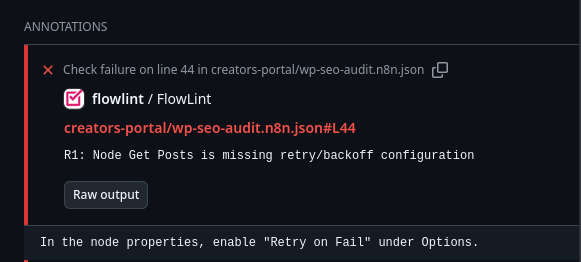
Flowlint is a linting tool for n8n workflows that identifies potential issues and suggests improvements. One of its most valuable checks is the R1 rule, which ensures nodes have proper retry configuration.
In this example, Flowlint flags an R1: Node is missing retry/backoff configuration issue, highlighting the importance of enabling Retry on Fail to build more resilient automations. Below is a detailed look at the configuration before and after applying the recommended fix, along with why this small adjustment makes a big difference in workflow reliability.
Why Retry Configuration Matters
Without retry logic, your workflows are vulnerable to:
- Transient network issues - Brief connectivity problems will fail the entire workflow
- API rate limits - Services may temporarily throttle requests
- Service hiccups - Even reliable APIs occasionally return 5xx errors
- Cascading failures - One failed API call can break complex multi-step automations
A simple retry configuration can transform a fragile workflow into a production-ready solution.
Before: No Retry Protection
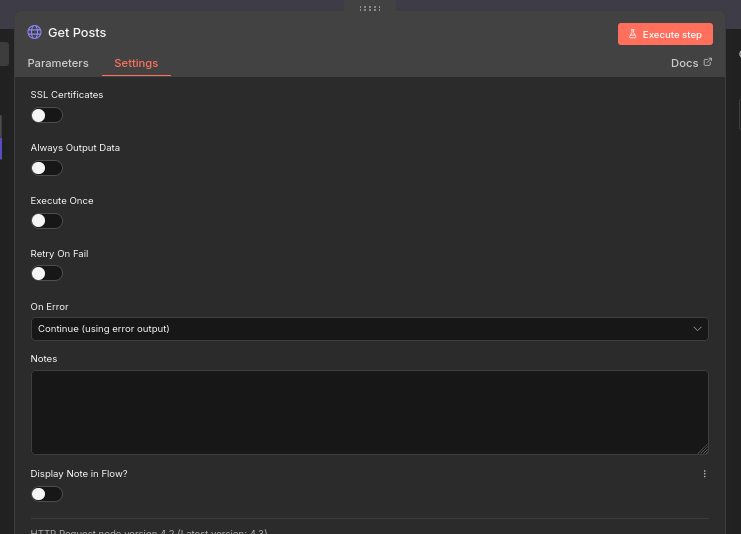
Before applying the fix, the n8n HTTP Request node contains only the default settings—meaning no retry or backoff behavior is defined. In this state, any API timeout, rate limit, or momentary outage will immediately propagate an error (if n8n HTTP Request node has On error set to Continue using error) or will stop the workflow (if n8n HTTP Request node has On error set to Stop Workflow). This is especially problematic for scheduled or multi-step automations that depend on consistent API availability.
In the screenshot, you can see:
Retry on Failis disabled- No additional retry configuration appears under Options
Configuration of n8n HTTP Request Node Before Fix
Configuration of n8n HTTP Request node before fix:
After: Resilient Configuration
After enabling Retry on Fail in n8n HTTP Request node, the Options panel exposes settings such as retry attempts, retry delay, and backoff mode. These parameters allow you to fine-tune how the node reacts to failures - attempting the request again with incremental delays instead of failing outright.
Configuration of n8n HTTP Request node after fix:
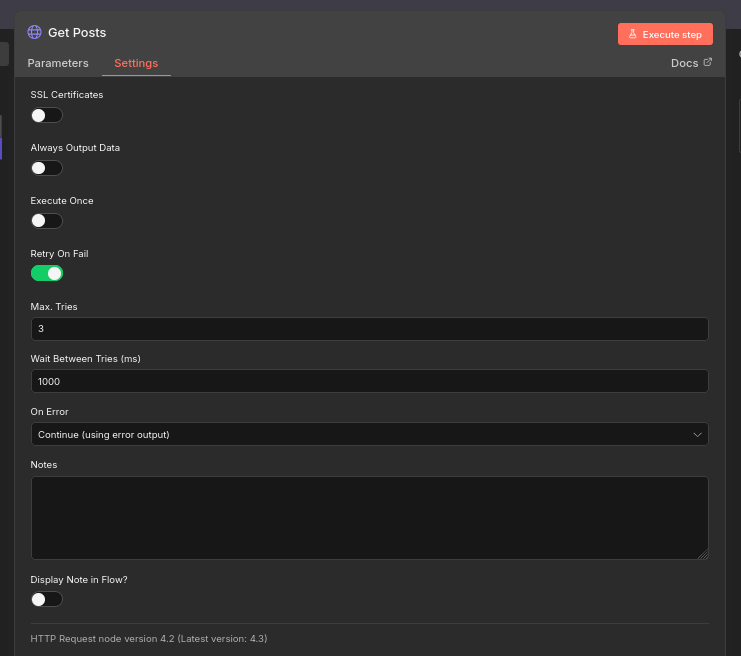
This improved configuration ensures:
- The workflow continues even when APIs momentarily respond with errors
- Backoff behavior prevents hammering APIs and respects rate limits
- Overall workflow stability increases, especially for long-running or unattended executions
Recommended Retry Settings
For most HTTP Request nodes, I suggest:
- Max Tries: 3-5 attempts
- Wait Between Tries: 1000ms (1 second)
- Backoff Mode: Exponential (doubles delay with each retry)
For rate-limited APIs, increase the initial wait time to 2000-5000ms.
Configuration Example
A typical production-ready configuration looks like this:
- Retry on Fail: Enabled
- Max Tries: 3
- Wait Between Tries: 1000ms
- Backoff Mode: Exponential
This means if the first request fails, n8n will:
- Wait 1 second, then retry
- If that fails, wait 2 seconds, then retry
- If that fails, wait 4 seconds, then retry
- If all retries fail, the node will error according to your
On errorsetting
When to Skip Retry Configuration
Retries aren't always appropriate. Skip retry configuration for:
- POST/PUT/DELETE operations without idempotency - May create duplicate records
- Payment processing - Could result in double charges
- Time-sensitive operations - Where stale data is worse than no data
- Webhook responses - Where the caller has their own timeout expectations
For these cases, implement custom error handling logic instead of automatic retries.
Conclusion
Configuring retry and backoff settings is a small change that dramatically improves workflow reliability. By following Flowlint's R1 recommendation and enabling Retry on Fail, you ensure your n8n automations can handle the inevitable hiccups that come with external API dependencies.
It is important to set retry and backoff configuration for n8n HTTP Request nodes to avoid cases when APIs return errors and workflows fail unnecessarily.
Remember: resilient workflows aren't just about handling success - they're about gracefully recovering from failure.











Comments