
Quick Fix: Click any node -> Change name from HTTP Request to describe what it does -> Example: "Fetch Customer Profile from Stripe API"
You've built a sophisticated n8n workflow with 20+ nodes. It works perfectly... until you need to debug it three months later. You stare at a sea of HTTP Request, Set, Code, Merge, and IF nodes, trying to remember which one fetches customer data and which one sends the welcome email.
Flowlint catches this common mistake with rule R10: Node uses a generic name. This rule ensures every node in your workflow has a descriptive name that explains its purpose, making your automations self-documenting and dramatically easier to maintain.
Why Node Names Matter
Generic names like HTTP Request, Merge, or Code create several problems:
Maintenance Nightmare When you return to a workflow weeks later, generic names force you to open each node to understand what it does. With 15 "HTTP Request" nodes and 5 "Merge" nodes, this becomes painful quickly.
Team Collaboration Issues Other team members (or future you) waste time deciphering your workflow logic. What seems obvious today becomes cryptic tomorrow.
Documentation Burden Without descriptive names, you need separate documentation explaining what each node does. Proper names make workflows self-documenting.
Real-World Example: SEO WordPress Audit
Let's look at a typical SEO WordPress Audit workflow before and after applying proper naming:
Before: Generic Names
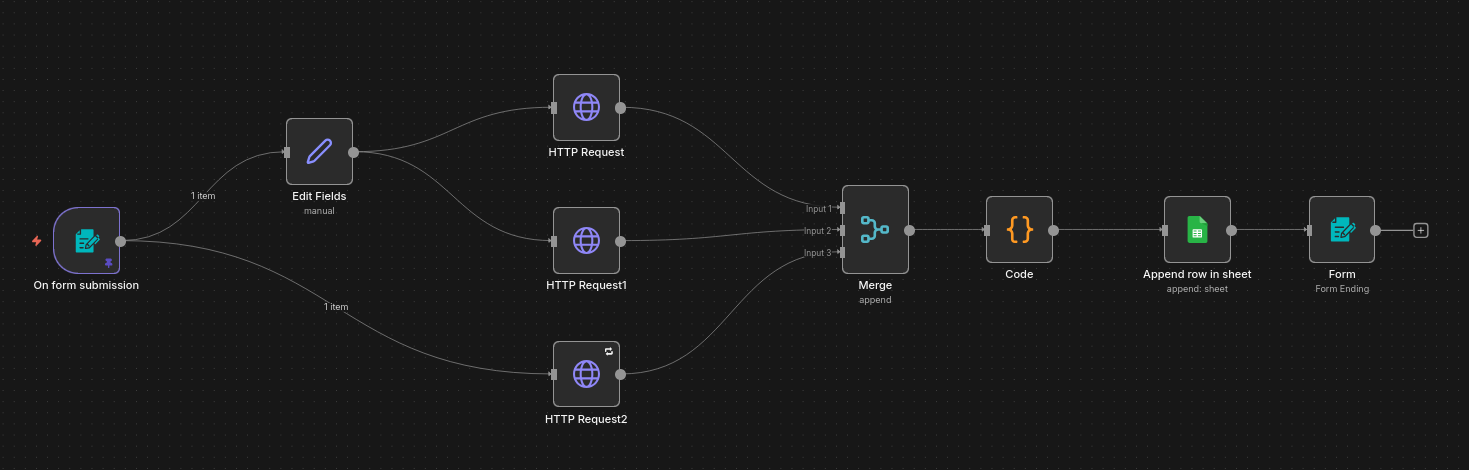
A workflow with nodes named:
Edit fieldsHTTP RequestHTTP Request 1HTTP Request 2MergeCodeAppend row in sheet
Without opening each node, can you tell what this workflow does? Neither can anyone else. Even me can't tell what this workflow does. Especially not after three months :)
Code of this workflow is available here.
After: Descriptive Names
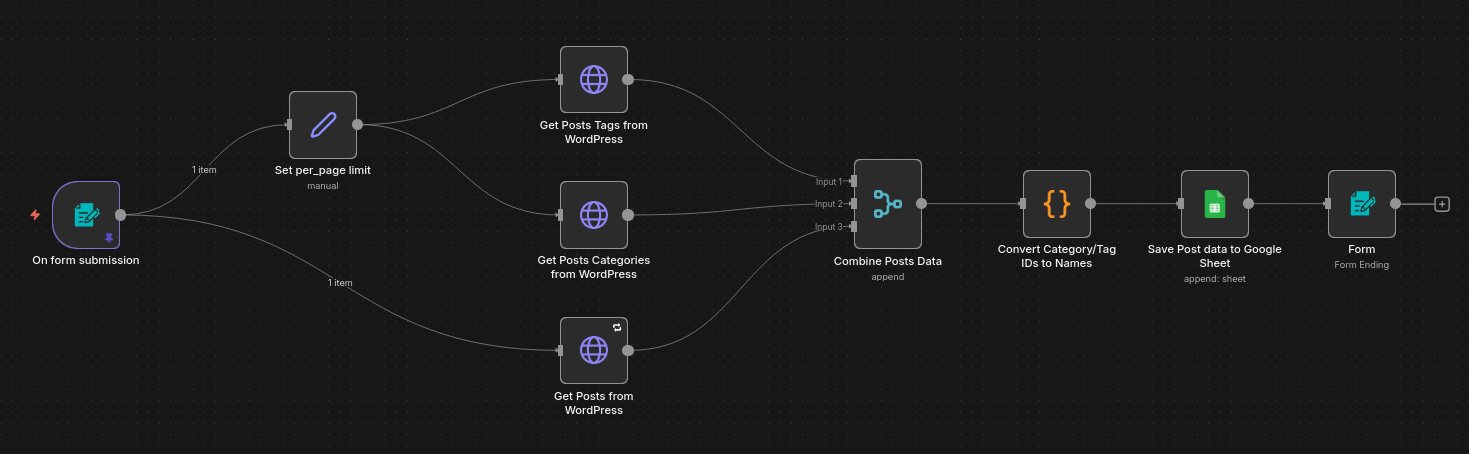
The same workflow with proper names:
Set per_page limitGet Posts Tags from WordPressGet Posts Categories from WordPressGet Posts from WordPressCombine Post DataSave Post data to Google Sheet
Now the workflow tells a story. You can understand the logic at a glance.
Node Naming Best Practices
1. Use Action Verbs
Start node names with verbs that describe what the node does:
Good naming patterns:
Fetch- Getting data from an APISend- Transmitting data somewhereUpdate- Modifying existing recordsCreate- Adding new recordsCalculate- Processing numbers or dataCheck- Conditional logicTransform- Converting data formatsFilter- Removing unwanted itemsCombine- Merging multiple data streamsParse- Extracting structured dataValidate- Checking data qualityEnrich- Adding data to existing recordsDeduplicate- Removing duplicate entriesSort- Ordering dataAggregate- Summarizing data
Examples:
- ❌
HTTP Request-> ✅Fetch Post Data from WordPress - ❌
Set-> ✅Prepare Webhook Payload - ❌
Code-> ✅Calculate Monthly Revenue - ❌
IF-> ✅Check if User is Premium - ❌
Merge-> ✅Combine Orders with Customer Data - ❌
Filter-> ✅Filter Active Subscribers - ❌
Webhook-> ✅Receive Stripe Payment Event
2. Include Context and Specifics
Add enough detail to distinguish similar nodes:
Avoid:
Get Data(too vague)API Call(which API?)Process Items(process how?)Merge Data(merge what with what?)
Prefer:
Get Customer Orders from Last 30 DaysCall Slack API to Post MessageProcess Items: Filter by Status=ActiveCombine User Info with Purchase History
3. Name by Business Logic, Not Technical Implementation
Focus on what the node accomplishes, not how:
Technical (bad):
HTTP GET to /api/v2/usersMongoDB QueryRun Python ScriptMerge Mode: Multiplex
Business-focused (good):
Fetch Active UsersStore Lead in DatabaseCalculate Commission RatesCombine Order and Shipping Info
4. Keep Names Concise but Clear
Aim for 3-7 words. Long enough to be descriptive, short enough to read quickly:
Too short:
Get User(which user? from where?)Merge(merge what?)
Too long:
Make HTTP Request to Stripe API to Fetch Customer Payment Methods and Filter Only Active CardsMerge Together the Customer Data from CRM with Order Data from Shopify Using Customer ID
Just right:
Fetch Active Payment Methods from StripeCombine Customer and Order Data
5. Use Consistent Patterns
Establish naming conventions for your team:
Pattern for HTTP Requests:
[Action] [Data] from/to [Service]
Fetch Orders from ShopifySend Invoice to XeroUpdate Contact in HubSpot
Pattern for Conditional Nodes:
Check if [Condition]
Check if Email is ValidCheck if Order Exceeds BudgetCheck if User Exists
Pattern for Data Transformation:
[Action] [Data] or Prepare [Data] for [Purpose]
Format Date FieldsPrepare Payload for WebhookTransform JSON to CSV
Pattern for Merge Nodes:
Combine [Data A] with [Data B]
Combine Users with TransactionsMerge Order and Inventory DataJoin Leads with Company Info
Common Generic Names to Avoid
| Generic Name | Why It's Bad | Better Alternatives |
|---|---|---|
HTTP Request |
Doesn't explain what you're requesting | Fetch Customer Profile, Send Order to Warehouse |
Set |
Doesn't explain what data you're setting | Prepare Email Variables, Build API Payload |
Code |
Doesn't explain what the code does | Calculate Discount Amount, Parse JSON Response |
IF |
Doesn't explain the condition | Check if Premium User, Validate Email Format |
Merge |
Doesn't explain what's being merged | Combine Orders with Customers, Join User and Transaction Data |
Filter |
Doesn't explain filtering criteria | Filter Active Subscribers, Remove Test Accounts |
Sort |
Doesn't explain sorting logic | Sort by Date Descending, Order by Priority |
Aggregate |
Doesn't explain aggregation | Sum Monthly Revenue, Count Orders by Status |
Webhook |
Doesn't explain what triggers it | Receive Stripe Payment, Handle New Form Submission |
Function |
Doesn't explain the function's purpose | Validate Phone Number, Generate UUID |
Split in Batches |
Doesn't explain what you're batching | Process Orders in Batches of 100 |
Wait |
Doesn't explain why you're waiting | Wait for Payment Confirmation, Delay for Rate Limit |
Edit Fields |
Doesn't explain which fields or why | Add Timestamp Fields, Rename Customer Columns |
Remove Duplicates |
Doesn't explain duplicates of what | Deduplicate Contacts by Email, Remove Duplicate Order IDs |
Move Binary Data |
Doesn't explain what data or why | Attach Invoice PDF to Email, Convert Image to Base64 |
Naming Strategy for Different Node Types
HTTP Request Nodes
Template: [Action] [Data] from/to [Service]
Examples:
Fetch User Profile from Auth0Send Notification to SlackUpdate Deal in PipedriveDelete Expired Token from API
Set Nodes
Template: Prepare [Data] or Build [Data] or Extract [Data]
Examples:
Prepare Customer FieldsBuild Webhook PayloadExtract Email and NameSet Default Values
Code Nodes
Template: [Action/Calculate/Transform] [Data]
Examples:
Calculate Tax AmountTransform CSV to JSONValidate Credit Card NumberGenerate Unique Order ID
IF Nodes
Template: Check if [Condition]
Examples:
Check if Order Total > $100Check if Email Domain is AllowedCheck if User is ActiveCheck if Weekend
Switch Nodes
Template: Route by [Criteria]
Examples:
Route by Customer TierRoute by Order StatusRoute by Country CodeRoute by Error Type
Merge Nodes
Template: Combine [Data A] with [Data B] or Join [Data] by [Key]
Examples:
Combine Orders with Customer DetailsMerge User Data with PreferencesJoin Products with Inventory LevelsMatch Invoices to Payments by ID
Merge Mode Context:
- Multiplex:
Combine All User Records - Append:
Append New Orders to Existing List - Keep Key Matches:
Match Orders with Customers by Email - Merge by Position:
Pair Questions with Answers by Order
Filter Nodes
Template: Filter [Data] by [Criteria] or Remove [Unwanted Data]
Examples:
Filter Active SubscriptionsRemove Test Email AddressesKeep Only Premium UsersFilter Orders from Last Week
Sort Nodes
Template: Sort [Data] by [Criteria]
Examples:
Sort Orders by Date DescendingOrder Customers by RevenueSort Products by PopularityRank Leads by Score
Aggregate Nodes
Template: [Aggregate Function] [Data] by [Group]
Examples:
Sum Revenue by Product CategoryCount Orders by CustomerCalculate Average Rating by ProductTotal Sales by Region and Month
Edit Fields Nodes
Template: [Add/Remove/Rename] [Field Names] or Modify [Data Structure]
Examples:
Add Timestamp and User IDRename Customer ColumnsRemove Sensitive Data FieldsFlatten Nested Order Structure
Remove Duplicates Nodes
Template: Deduplicate [Data] by [Key]
Examples:
Deduplicate Contacts by EmailRemove Duplicate Orders by IDKeep Unique Products by SKUFilter Duplicate Transactions
Move Binary Data Nodes
Template: [Action] [File/Data] to/from [Location]
Examples:
Attach Invoice PDF to EmailConvert Product Image to Base64Extract CSV Data to JSONMove Uploaded File to Binary Field
Loop Nodes
Template: For Each [Item] or Process [Items]
Examples:
For Each InvoiceProcess Each Customer RecordLoop Through Product IDsIterate Over Failed Orders
Execute Workflow Nodes
Template: Run [Workflow Name] or Execute [Purpose]
Examples:
Run Customer Enrichment WorkflowExecute Invoice GenerationTrigger Email Validation ProcessRun Backup Workflow
Spreadsheet File Nodes
Template: [Action] [Data] to/from [Spreadsheet]
Examples:
Read Customer List from ExcelWrite Sales Report to CSVExport Orders to Google SheetsParse Invoice Data from XLSX
Real-World Workflow Examples
Example 1: Customer Onboarding with Data Enrichment
Before (generic names):











Comments